git
git commands
.git
├── branches
├── config
├── description
├── HEAD
├── hooks
│   ├── applypatch-msg.sample
│   ├── commit-msg.sample
│   ├── fsmonitor-watchman.sample
│   ├── post-update.sample
│   ├── pre-applypatch.sample
│   ├── pre-commit.sample
│   ├── pre-merge-commit.sample
│   ├── prepare-commit-msg.sample
│   ├── pre-push.sample
│   ├── pre-rebase.sample
│   ├── pre-receive.sample
│   └── update.sample
├── info
│   └── exclude
├── objects
│   ├── info
│   └── pack
└── refs
├── heads
└── tags
Ubuntu install
sudo add-apt-repository ppa:git-core/ppa
sudo apt update
sudo apt install git
Git practices
git init
echo 'test text' | git hash-object -w --stdin

git cat-file -t .git/objects/d6/..hash
git cat-file -p .git/objects/d6/..hash

find .git/objects -f

echo 'test text' > test.txt
git hash-object -w test.txt
git update-index --add --cacheinfo 100644 d6..hash
git write-tree

git ls-files -s
git config --global user.name "someone"git config --global user.email "someone@example.com"git config --global core.editor "vim"git add .git diffshow you any uncommitted changes since the last commitgit statusgit stashgit stash popgit stash listgit stash apply stash@{1}git stash show -pgit stash branch feat/stylesheet stash@{1}git stash drop stash@{1}git stash cleargit cleanundoing uncommitted changesgit commit --allow-empty -m "release: v0.0.1"git commit -m 'feat: #task-hash new features introduced'git commit --amend -m 'issue: #task-hash some issue fixed'git commit --amend --no-edit--no-edit flag will allow you to make the amendment to your commit without changing its commit messagegit tagTo list stored tags in a repogit tag -a v1.4 -m "my version 1.4"git tag -a -f v1.4 <commit_hash>update an existing taggit tag -d v1.3git remote -vgit remote add <name> <url>git remote rm <name>git remote rename <old_name> <new_name>git remote show upstreamgit remote -v showgit pushgit push -u origin mastergit push <remote> --allgit push <remote> --tagsgit branch -agit branch -D branch_namegit push origin :branch_namea branch name prefixed with a colon to git push will delete the remote branchgit fetch -all --prunegit fetch coworkers_repo coworkers/feature_branchgit branch coworkers/feature_branch origin/developgit checkout coworkers/feature_branchgit checkout -b local_feature_branchgit pullgit checkout -b developgit checkout -b develop origin/developgit blame -L 1,10 README.mdexamine specific points of a file's history and get context as to who the last author was that modified the linegit branch -m old_branch_name new_branch_namegit cherry-pick <commit_sha>// single commitgit cherry-pick old..new// range of commit, old(exclude), new(include)git cherry-pick old~..new// old(include), new(exclude)git reflog --relative-dategit log --graph --oneline --decorate -10 --after="2022-06-1"git log --grep="<pattern>"git log <hash_since>..<hash_until>
# Rebase current HEAD point and back one commit onto the origin/master branch
git rebase --onto origin/master HEAD~ HEAD

# Rebase current HEAD point and back 8 commits onto the origin/master branch
git rebase --onto origin/master HEAD~8 HEAD

# Rebase current branch "branch-name" and back 5 commits onto the origin/master branch
git rebase --onto origin/master branch-name~8 branch-name

# Push your change to the remote branch develop at the origin server
git push origin HEAD:develop
# These commands push a given <BranchToPush> to the remote master or remote develop branch
git push origin <BranchToPush>:develop
git push origin <BranchToPush>:master

# Show-Ref Commands, used to see all recent changes
git show-ref master
git show-ref HEAD
git show-ref branch
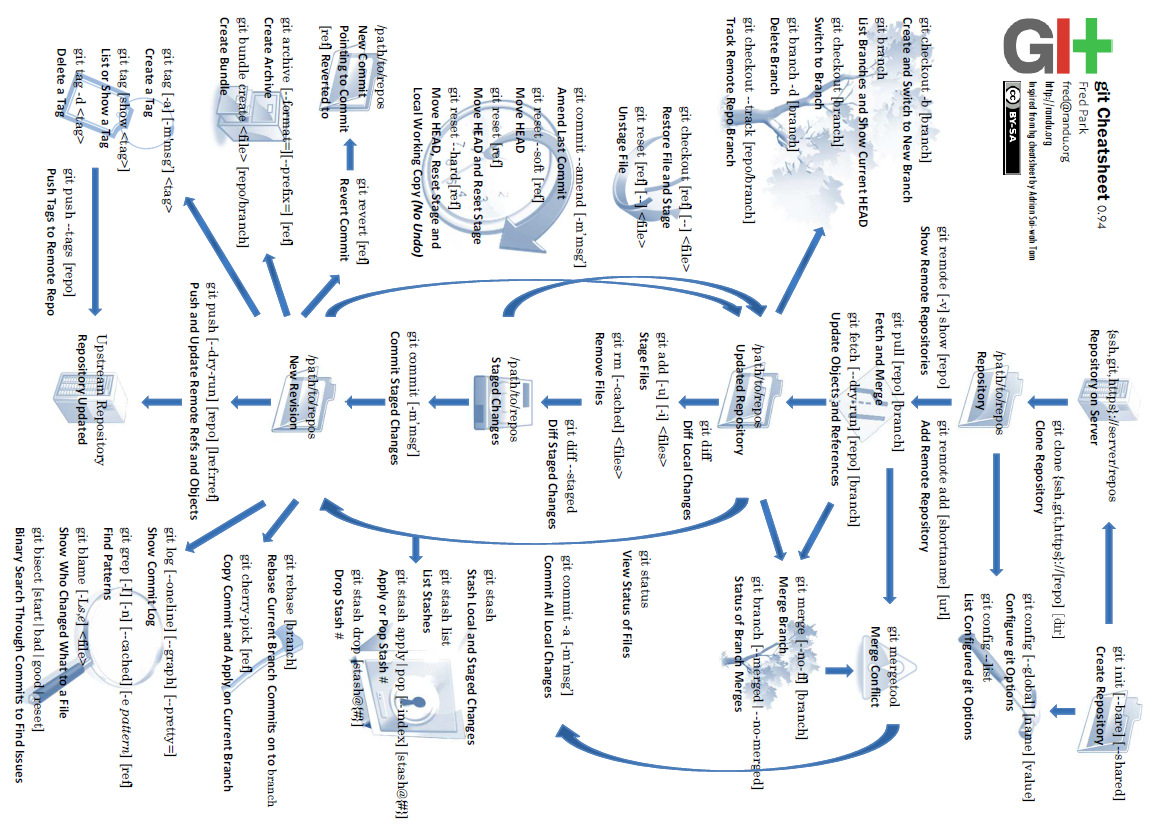
Useful Commands
# See who last modified each line of a file
git blame -L 20,40 app.js

# Search across history for a string (super fast)
git log -S 'myFunction' --oneline

# view file content as certain hash
git show a1f710b:src/path/to/.ts > temp_restore.ts
# verbose logging
 GIT_CURL_VERBOSE=1 GIT_TRACE=1  git <operation>

# Undo last commit but keep changes staged
git reset --soft HEAD~1

# Undo last commit and unstage changes
git reset --mixed HEAD~1

# Discard last commit completely (dangerous)
git reset --hard HEAD~1

# Drop local commits but keep working tree intact
git reset --keep origin/main

# Fix an old commit (not just the latest)
git rebase -i <commit_before_target>
# mark commit as "edit"
git commit --amend
git rebase --continue

# Split a single commit into multiple commits
git rebase -i <commit_before_target>
# choose "edit"
git reset HEAD^
git add -p   # stage parts
git commit   # repeat for chunks
git rebase --continue

# Delete all local branches already merged into main
git branch --merged main | grep -v "main" | xargs git branch -d
Advanced stashing
# Stash only staged changes
git stash push --staged -m "save staged only"

# Stash specific files
git stash push -m "tmp fix" path/to/file1 path/to/file2

# Apply a stash without dropping it
git stash apply stash@{2}
Submodule
# main repo
git remote add origin git@github.com:cu-ecen-aeld/assignment-1-username.git
git pull
# add submodule
git submodule add https://gitlab.com/buildroot.org/buildroot/
# or
git remote add assignments-base https://github.com/cu-ecen-aeld/aesd-assignments.git
#  pulls the content locally to match the latest status at https://github.com/cu-ecen-aeld/aesd-assignments
git fetch assignments-base
# This command makes your master branch match the master branch
git merge assignments-base/master
# clones the `assignment-autotest` submodule and nested git repositories
git submodule update --init --recursive
# clone specific submodule
git submodule update --init --remote specific_submodule

# To clone a project with submodules
git clone --recurse-submodules git@github.com:cu-ecen-aeld/assignment-1-username.git
Github self-host runner
# Create a folder
$ mkdir actions-runner && cd actions-runner
Copied!# Download the latest runner package
$ curl -o actions-runner-linux-x64-2.322.0.tar.gz -L https://github.com/actions/runner/releases/download/v2.322.0/actions-runner-linux-x64-2.322.0.tar.gz
Copied! # Optional: Validate the hash
$ echo "b13b784808359f31bc79b08a191f5f83757852957dd8fe3dbfcc38202ccf5768  actions-runner-linux-x64-2.322.0.tar.gz" | shasum -a 256 -c
# Extract the installer
$ tar xzf ./actions-runner-linux-x64-2.322.0.tar.gz

# Configure
# Create the runner and start the configuration experience
$ ./config.sh --url https://github.com/cu-ecen-aeld/assignment-1-username --token token_provided_by_github
# Last step, run it!
$ ./run.sh
.github/workflows/github-actions.yml
name: assignment-test
on:
  push:
    tags-ignore:
      - "*"
    branches:
      - "*"
jobs:
  unit-test:
    container: cuaesd/aesd-autotest:24-unit-test
    runs-on: self-hosted
    steps:
      - uses: actions/checkout@v2
      - name: Checkout submodules
        run: git submodule update --init --recursive
      - name: Run unit test
        run: ./unit-test.sh
  full-test:
    container: cuaesd/aesd-autotest:24-assignment1
    runs-on: self-hosted
    steps:
      - uses: actions/checkout@v2
      - name: Checkout submodules
        run: git submodule update --init --recursive
      - name: Run full test
        run: ./full-test.sh
ssh
ssh-keygen -t rsa -b 4096
ssh-keygen -t dsa
ssh-keygen -t ecdsa -b 521
ssh-keygen -t ed25519
Git Internals - Evnironment Variables
# verbose logging
GIT_CURL_VERBOSE=1 GIT_TRACE=1 git pull

## ssh debug
GIT_SSH_COMMAND="ssh -vvv" git --no-replace-objects ls-remote ssh://git@git.github.com/npm/ipqs_iam.git
Proxy config
# view
git config --glbal -l
# set proxy
git config --global http.proxy 127.0.0.1:59527
git config --global https.proxy 127.0.0.1:59527

npm config set proxy http://127.0.0.1:59527
npm config set https-proxy http://127.0.0.1:59527

# unset
git config --global --unset http.proxy
git config --global --unset https.proxy
windows git issue
# windows: \r\n  unix: \r   linux: \n
git config --global core.authocrlf true

# file perimission auto change
git config --add core.filemode false
git status | grep typechange | awk '{print $2}' | xargs git checkout

## soft link
# 1. find ln files 120000
git ls-files -s
# 2. edit ln files with `mklink`
mklink [/D] [/H] [/J] LINK TARGET
# 3. block ln files modification
git update-index --assume-unchanged
Actions runner
# visitor github repository > settings > actions > runner > new
mkdir actions-runner && cd actions-runner
# Download the latest runner package
curl -o actions-runner-linux-x64-2.326.0.tar.gz -L https://github.com/actions/runner/releases/download/v2.326.0/actions-runner-linux-x64-2.326.0.tar.gz
# Optional: Validate the hash
echo "9c74af9b4352bbc99aecc7353b47bcdfcd1b2a0f6d15af54a99f54a0c14a1de8  actions-runner-linux-x64-2.326.0.tar.gz" | shasum -a 256 -c
# Extract the installer
tar xzf ./actions-runner-linux-x64-2.326.0.tar.gz
# Create the runner and start the configuration experience
./config.sh --url https://github.com/<username>/<repositoryname> --token <actual_token>
# Last step, run it!
./run.sh
Page Source