Artificial Intelligence
History & Timeline of AI
The entries below walk through the major eras of AI in chronological order. Each era lists the defining ideas, representative systems, and the application scenarios they unlocked. Later sections of this document (roadmap, terminology, CNN, NLP, LLM Engineering, MLOps, Responsible AI) expand on these ideas in practice, and nothing from the original notes has been removed.
1943-1956 — Symbolic seeds and the birth of AI
The field grew out of logic, cybernetics, and neuroscience before it had a name. Two threads ran in parallel: symbolic reasoning over rules, and simplified mathematical models of the neuron.
- McCulloch & Pitts (1943) proposed the first mathematical neuron, showing that networks of binary threshold units could in principle compute any logical function.
- Alan Turing (1950) asked "Can machines think?" in Computing Machinery and Intelligence and framed the imitation game (Turing Test).
- Rosenblatt (1957) built the Perceptron, a trainable linear classifier implemented partly in hardware.
- Dartmouth Workshop (1956) coined the term Artificial Intelligence; McCarthy, Minsky, Shannon, Rochester and others set the research agenda.
Application scenarios (mostly aspirational at the time): theorem proving, checkers and chess playing programs, early natural language parsers, and pattern recognition for printed characters.
1956-1974 — Early AI and the first golden age
Symbolic AI dominated. Programs manipulated symbols and rules, and early optimism suggested human-level AI was a decade away.
- Logic Theorist (1956) and General Problem Solver (1957) by Newell & Simon used means-ends analysis to prove theorems.
- LISP (1958), invented by John McCarthy, became the de-facto AI language for decades.
- ELIZA (1966) by Weizenbaum simulated a Rogerian therapist with simple pattern matching and is the intellectual ancestor of every rule-based chatbot.
- SHRDLU (1970) by Winograd manipulated a blocks world through natural language commands, showing early grounded language understanding.
- ALPAC report (1966) and Lighthill report (1973) criticized limited progress, foreshadowing the first AI winter.
Application scenarios: theorem proving, symbolic math (MACSYMA), toy natural-language interfaces, early game playing, and the first expert-system prototypes such as DENDRAL for chemical structure identification.
1974-1980 — The first AI winter
Overpromising met the reality of combinatorial explosion, limited compute, and the collapse of perceptron hype after Minsky & Papert's 1969 book Perceptrons pointed out XOR-style limitations of single-layer networks. DARPA and UK funding dried up, and neural network research went largely dormant.
Even so, important groundwork continued:
- Backpropagation was independently rediscovered through the 1970s (Werbos 1974) but did not gain traction until the 1980s.
- Knowledge representation (frames, semantic networks, scripts) matured and seeded the next wave of expert systems.
Application scenarios of what survived: narrow rule-based systems for scheduling, configuration, and medical triage in research settings.
1980-1987 — Expert systems boom
The commercial breakthrough came from rule-based expert systems that encoded the knowledge of human specialists as if-then rules backed by inference engines.
- MYCIN (Stanford) diagnosed bacterial infections and recommended antibiotics.
- XCON / R1 (DEC) configured VAX computers and reportedly saved DEC tens of millions of dollars per year.
- Japan's Fifth Generation Project (1982) bet on parallel logic programming (Prolog-style) for next-generation AI.
- Hopfield networks (1982) and the Boltzmann Machine revived interest in connectionism.
- Rumelhart, Hinton & Williams (1986) popularized backpropagation for multi-layer perceptrons, re-opening neural network research.
Application scenarios: medical diagnosis, industrial configuration, fault diagnosis, financial credit scoring, and rule-based process automation — the direct ancestors of today's Decision/BPM systems.
1987-1993 — The second AI winter
Specialized Lisp machines could not compete with general-purpose workstations from Sun and Apollo. Expert systems proved brittle: expensive to maintain, weak at common sense, and unable to learn from data. Funding contracted again, and neural networks were still too compute-hungry for most tasks.
Under the surface, the building blocks of modern AI were being laid:
- LeNet (Yann LeCun, 1989) demonstrated convolutional neural networks for handwritten digit recognition, deployed at scale for reading bank checks.
- Q-learning (Watkins, 1989) formalized model-free reinforcement learning.
- Hidden Markov Models became dominant in speech recognition.
- Support Vector Machines (Cortes & Vapnik, 1995) introduced margin-based learning with kernels.
Application scenarios that paid the bills: OCR for postal and banking workflows, speech recognition research, and statistical NLP.
1993-2011 — Statistical ML and data-driven AI
With the web, cheap storage, and growing CPU power, AI shifted from hand-coded rules to learning from data. This is the era that still supplies most production tabular models today.
- Random Forests (Breiman, 2001) and Gradient Boosting (Friedman, 2001; later XGBoost, LightGBM, CatBoost) dominated tabular problems.
- Latent Dirichlet Allocation (2003) gave probabilistic topic modeling.
- Netflix Prize (2006-2009) popularized matrix factorization for recommender systems.
- IBM Deep Blue defeated Kasparov in 1997; IBM Watson won Jeopardy! in 2011 using ensembles of IR, NLP, and ML components.
- Statistical MT (phrase-based SMT, Moses) powered Google Translate until 2016.
- Big data stack (Hadoop, MapReduce, then Spark) made training on terabytes feasible.
Application scenarios: search ranking, email spam filtering, recommender systems, credit-risk scoring, fraud detection, statistical machine translation, and the first commercially successful speech assistants. This material maps directly onto Classical Machine Learning and Big Data in this repo.
2012-2016 — The deep learning revolution
GPUs, large labeled datasets, and ReLU-style architectures unlocked deep learning at scale.
- AlexNet (Krizhevsky, Sutskever & Hinton, 2012) halved error on ImageNet and made CNNs the default for vision overnight.
- Word2Vec (Mikolov, 2013) and GloVe (2014) produced dense word embeddings that captured analogies such as
king - man + woman ≈ queen. - Sequence-to-sequence with attention (Bahdanau, 2014; Sutskever, 2014) set the stage for neural machine translation, replacing statistical MT in Google Translate (GNMT, 2016).
- GANs (Goodfellow, 2014) and VAEs (Kingma & Welling, 2014) created usable generative models for images.
- ResNet (He et al., 2015) made very deep networks trainable via residual connections.
- AlphaGo (DeepMind, 2016) combined deep RL with Monte Carlo Tree Search to beat Lee Sedol.
- TensorFlow (2015) and PyTorch (2016) became the dominant frameworks.
Application scenarios: image classification and detection (covered later in CNN, Object Detection, R-CNN), face recognition, speech recognition (DeepSpeech), neural machine translation, style transfer, and the first wave of production self-driving perception stacks.
2017-2019 — The Transformer and the pre-training era
Attention replaced recurrence, and pre-training on massive unlabeled text became the new default.
- "Attention Is All You Need" (Vaswani et al., 2017) introduced the Transformer with multi-head self-attention, no RNNs, and massive parallelism. Details in
Transformers/Core Concepts. - ULMFiT (2018), ELMo (2018), and especially BERT (Devlin et al., 2018) established the pre-train + fine-tune recipe for NLP using masked language modeling.
- GPT-1 (2018) and GPT-2 (2019) showed that causal language modeling at scale produces surprisingly general text generators. GPT-2 was initially withheld over concerns about misuse.
- T5 (2019) unified NLP tasks under a single text-to-text encoder-decoder framework.
- XLNet, RoBERTa, ALBERT, DistilBERT iterated on BERT for accuracy, speed, and size.
Application scenarios: high-quality neural MT, search ranking upgrades (BERT in Google Search, 2019), semantic similarity and retrieval, sentiment and intent classification, question answering over Wikipedia, code completion prototypes, and the first production embeddings for recommendation. This era is the foundation of everything under ai/transformers/ and ai/llm/.
2020-2022 — Foundation models and scaling laws
Models grew by orders of magnitude, and emergent capabilities — in-context learning, chain-of-thought reasoning, tool use — appeared only at scale.
- GPT-3 (2020, 175B parameters) made in-context/few-shot prompting a practical paradigm: you program behavior via examples in the prompt rather than fine-tuning.
- Scaling laws (Kaplan et al., 2020; Chinchilla, 2022) quantified how loss improves as a power law of parameters, data, and compute, and showed most models were under-trained on data.
- Vision: ViT (2020) brought Transformers to images; CLIP (2021) aligned images and text in a shared space.
- Code: Codex (2021) powered GitHub Copilot, turning autoregressive LMs into pair programmers.
- Generative images: DALL-E (2021), GLIDE, Stable Diffusion (2022), and Midjourney popularized diffusion-based text-to-image. See
DALL-E 3 notes. - Alignment: InstructGPT (2022) introduced RLHF (reward model + PPO) to make models follow instructions; this is the direct precursor of ChatGPT.
- Open models: BLOOM, OPT, and early LLaMA research previews began a thriving open-weight ecosystem.
Application scenarios: code assistants, AI-assisted writing, semantic search with dense embeddings, text-to-image creative tooling, voice clones, and the first serious production use of LLMs behind API keys.
2022-2024 — ChatGPT, RAG, agents, and multimodal
The launch of ChatGPT in November 2022 turned LLMs into a mass-market product and reframed AI as a general-purpose interface.
- ChatGPT (Nov 2022) and GPT-4 (Mar 2023) demonstrated strong zero-shot reasoning, coding, and tool use, with GPT-4 adding native image input and passing many professional exams. See
ChatGPT notes. - Open-weight LLMs exploded: LLaMA / LLaMA 2 / LLaMA 3 (Meta), Mistral / Mixtral, Qwen, Gemma, DeepSeek, Yi, Phi. Quantized runtimes such as llama.cpp and Ollama made local inference practical.
- PEFT: LoRA (2021) and QLoRA (2023) made fine-tuning feasible on a single consumer GPU. Details in
llm/fine-tuning.mdand theTransformers/Fine-tuningsection of this repo. - Preference tuning beyond RLHF: DPO (2023) removed the reward model step and became a popular alternative.
- RAG became the default pattern for grounded Q&A: chunk → embed → vector search → re-rank → synthesize. See
llm/index.mdandmilvus.md. - Agent frameworks: LangChain, LlamaIndex, AutoGen, CrewAI orchestrated tool calls and multi-agent workflows. See
langchain.md,llama_index.md,autogen.md. - Multimodal assistants: GPT-4o (2024), Claude 3 / 3.5, Gemini 1.5 Pro, Sora (video) unified text, image, audio, and video I/O.
- Long context: 100K-1M token windows (Claude, Gemini 1.5 Pro) reshaped RAG vs. long-context trade-offs.
- Inference serving: vLLM, TGI, TensorRT-LLM productionized continuous batching and paged-attention KV caches.
Application scenarios: conversational assistants, enterprise RAG over private documents, AI coding (Cursor, Copilot, Claude Code), customer support triage, document extraction, contract review, content generation, text-to-speech, speech-to-text at near-human quality, and AI-native search.
2025-2026 — Reasoning models, agentic systems, and on-device AI
The current frontier pushes three directions at once: explicit reasoning at inference time, autonomous agents, and shrinking models that run on the edge.
- Reasoning models trained with large-scale RL on verifiable rewards: OpenAI o-series (o1, o3), DeepSeek-R1, Claude 3.7/4 thinking modes, Gemini 2.5 Thinking, Qwen3. They spend compute at inference ("test-time scaling") to plan, self-critique, and verify.
- Agentic systems move beyond single-shot chat: persistent task execution, computer use (Claude's Computer Use, OpenAI Operator), coding agents (Cursor Agent, Claude Code, Devin), multi-agent orchestration, and long-running background tasks.
- Mixture-of-Experts at scale: sparse MoE models (DeepSeek-V3/V4, Mixtral successors, GPT-4 family) deliver frontier quality at lower active-parameter cost.
- On-device / edge AI: Phi-3/4, Gemma 2/3, Qwen2.5/3 small, Llama 3.2, and distilled 1-8B models run on laptops, phones, and NPUs. Quantization (GGUF, AWQ, GPTQ, FP8) and runtimes (llama.cpp, MLX, ONNX Runtime, NPU toolchains) are part of every deploy story. See the Jetson Nano experiments in
Transformers / Jetson Nanoandiot/jetson/index.md. - Evaluation shifts from static benchmarks to LLM-as-judge, agent benchmarks (SWE-bench, WebArena, OSWorld), and task-specific eval harnesses.
- Regulation & safety: the EU AI Act comes into force, the NIST AI RMF matures, and model cards, red-teaming, and provenance (C2PA) become standard.
- AI-native software: IDEs (Cursor, Windsurf), browsers, OSes, and phones ship with AI at the core rather than bolted on.
Application scenarios: autonomous coding agents that plan across repos, end-to-end customer support that can act on APIs, AI analysts for finance and healthcare triage (under human review), on-device assistants for privacy-sensitive data, AI-generated video for marketing and prototyping, and the first production "AI employees" handling narrow back-office workflows.
For a hands-on path through modern models and serving, see llm/index.md, llm/fine-tuning.md, and transformers/index.md.
Concepts → application scenarios cheat sheet
A quick way to map the ideas above to where they show up in production today:
| Concept / era | Core idea | Today's application scenarios |
|---|---|---|
| Expert systems (1980s) | Hand-coded if-then rules + inference engine | Compliance checks, decision tables, BPM, triage rule engines |
| Classical ML (1990s-2010s) | Learn functions from tabular data | Credit scoring, fraud detection, churn, demand forecasting, A/B analysis |
| CNNs (2012+) | Local filters + hierarchy for grid data | Image classification, defect inspection, medical imaging, face/OCR, AV perception |
| RNN / LSTM (2014+) | Recurrence over sequences | Legacy speech-to-text, time-series forecasting, early MT (still useful for small-footprint devices) |
| Word embeddings (2013+) | Words as dense vectors | Semantic search, recommendation, clustering, de-duplication |
| Transformers (2017+) | Self-attention over sequences | Translation, summarization, classification, embeddings, code models |
| Pre-training + fine-tuning (2018+) | Train once on huge corpus, adapt cheaply | Task-specific NLP, domain adapters, LoRA for private data |
| Diffusion models (2022+) | Iterative denoising in latent space | Text-to-image, text-to-video, image editing, design assistants |
| LLMs + prompting (2020+) | Few-shot, chain-of-thought, tool calling | General assistants, writing, coding, data extraction |
| RAG (2023+) | Retrieve → ground → generate | Enterprise Q&A, support copilots, legal/medical assistants, site search |
| Agents (2023+) | Plan + tool use + memory | Coding agents, browsing agents, workflow automation, research assistants |
| Reasoning models (2024+) | Inference-time compute + RL on verifiable tasks | Hard math/code, theorem aided proofs, complex planning, autonomous debugging |
| On-device / edge AI (2024+) | Quantized small models | Private chat, offline voice, industrial edge, IoT copilots (see Jetson Nano) |
The rest of this page (roadmap, terminology, CNN, NLP, LLM Engineering, MLOps, Responsible AI) elaborates on each of these rows and links to concrete code and tools.
Learning Roadmap
A practical 6-stage path, distilled from 2026 guidance by Coursera, Dataquest, Fast.ai and DeepLearning.AI. Build intuition, not mastery, at each stage — and ship small projects throughout instead of waiting until the end.
Math Foundations"] --> Python["Stage 1
Python & Tooling"] Python --> ClassicML["Stage 2
Classical ML"] ClassicML --> DL["Stage 3
Deep Learning"] DL --> NLP["Stage 4
NLP & Transformers"] NLP --> LLM["Stage 5
LLM & AI Engineering"] DL --> Specialized["Specialized tracks
CV / Audio / RL"]
- Stage 0 — Math Foundations (2-4 weeks): linear algebra, calculus, probability & statistics. Build enough intuition to read a model paper.
- Stage 1 — Python & ML Tooling (2-3 weeks): NumPy, Pandas, Matplotlib, scikit-learn, Jupyter. Get fluent at data wrangling and quick experiments.
- Stage 2 — Classical Machine Learning (4-6 weeks): supervised vs unsupervised, regression, trees, ensembles (XGBoost/LightGBM), SVM, clustering, PCA, evaluation metrics. A lot of real-world wins still come from here.
- Stage 3 — Deep Learning (4-8 weeks): neural network basics, backprop, CNNs, RNN/LSTM, regularization, training loop in PyTorch. See
### Neural Networks and Trainingand### Convolutional Neural Networks(CNN)below. - Stage 4 — NLP & Transformers (3-5 weeks): tokenization, embeddings, attention, the Transformer, encoder vs decoder vs encoder-decoder, pre-training vs fine-tuning.
- Stage 5 — LLM & AI Engineering (ongoing): prompt engineering, RAG, agents, evaluation, cost/latency, deployment. Cross-link to
ai/llm/index.mdandai/llm/fine-tuning.md.
Math Foundations
Three pillars cover ~80% of what you need to read papers and implement models.
- Linear Algebra: vectors, matrices, dot product, matrix multiplication, rank, inverse, eigenvalues/eigenvectors, SVD, linear transformations.
- Calculus: derivatives, partial derivatives, the chain rule, gradients and Jacobians, function optimization (this is what gradient descent does).
- Probability & Statistics: distributions (Gaussian, Bernoulli, categorical), Bayes' theorem, expectation/variance, MLE vs MAP, hypothesis testing, confidence intervals.
Curated resources:
- 3Blue1Brown — Essence of Linear Algebra
- 3Blue1Brown — Essence of Calculus
- Coursera — Mathematics for Machine Learning and Data Science Specialization
- The Roadmap of Mathematics for Machine Learning (Tivadar Danka)
- MIT 18.06 Linear Algebra (Gilbert Strang)
- Seeing Theory — visual intro to probability & statistics
Python & ML Tooling
Ship experiments, not just notebooks. Pick one framework and go deep.
- Core libraries: NumPy (arrays), Pandas (tabular), Matplotlib / Seaborn (viz), scikit-learn (classical ML), Jupyter.
- Deep learning frameworks:
- PyTorch — dominant in research and most 2026 LLM work. Recommended default.
- TensorFlow / Keras — still strong for production and mobile (TFLite).
- JAX — functional, great for novel research and TPUs.
- LLM ecosystem: Hugging Face Transformers, Datasets, Accelerate, PEFT for LoRA/QLoRA.
- Dev ergonomics: uv or poetry for envs, ruff for linting, pytest for tests.
Classical Machine Learning
Still the right tool for tabular data, small datasets, and most business problems. Don't skip it.
- Supervised — regression: linear, ridge/lasso, polynomial.
- Supervised — classification: logistic regression, k-NN, SVM, naive Bayes.
- Trees & ensembles: decision trees, random forests, gradient boosting. Learn XGBoost and LightGBM — they still win many Kaggle and production tabular problems.
- Unsupervised: k-means, hierarchical clustering, DBSCAN, PCA, t-SNE, UMAP.
- Evaluation: train/val/test splits, k-fold cross-validation, accuracy vs precision/recall/F1, ROC-AUC, calibration, confusion matrices.
- Feature engineering: scaling, encoding categoricals, handling missing data, leakage, target encoding.
Curated resources:
- Andrew Ng — Machine Learning Specialization (Coursera)
- Hands-On Machine Learning with Scikit-Learn, Keras & TensorFlow (Aurélien Géron)
- An Introduction to Statistical Learning (free PDF)
- scikit-learn user guide
- Kaggle Learn — hands-on micro-courses
Terminology
Neurons
| Name | Description |
|---|---|
| Vanilla | Basic unit computing weighted sum + activation; used in FFNNs and CNNS |
| LSTM | Advanced neuron with memory and gates for long-term dependencies in sequences |
Layers
| Name | Description |
|---|---|
| Fully Connected | Standard layer where each neuron connects to all inputs |
| Recurrent | Maintains memory across timesteps; used in RNNs, LSTMs |
| Convolutional | Extracts spatial features using filters; used in image data |
| Attention | Computes weighted importance of different inputs; key in Transformers |
| Pooling | Downsamples spatial data; used in CNNs to reduce size and noise |
| Normalization | Stabilizes training by normalizing activations; includes BatchNorm, LayerNorm, GroupNorm |
| Dropout | Randomly deactivates neurons during training to prevent overfitting |
Activations
| Name | Description |
|---|---|
| ReLU | max(0, x); fast, widely used in deep networks |
| Sigmoid | S-shaped, output in (0, 1); used in binary classification |
| Tanh | Like sigmoid but centered at 0; output in (-1, 1) |
| Softmax | Outputs a probability distribution; used in final layer of multi-class classification |
Networks
| Name | Description |
|---|---|
| Feedforward (FFNN) | Basic architecture with no loops; used for static input-output tasks |
| RNN | Handles sequential data using recurrence; remembers previous inputs |
| CNN | Uses convolutions to process grid-like data such as images |
| Transformer | Uses self-attention to model sequences without recurrence; state-of-the-art in NLP & beyond |
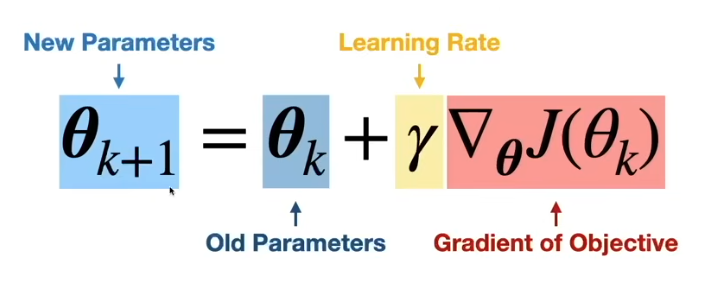
Gradient Descent
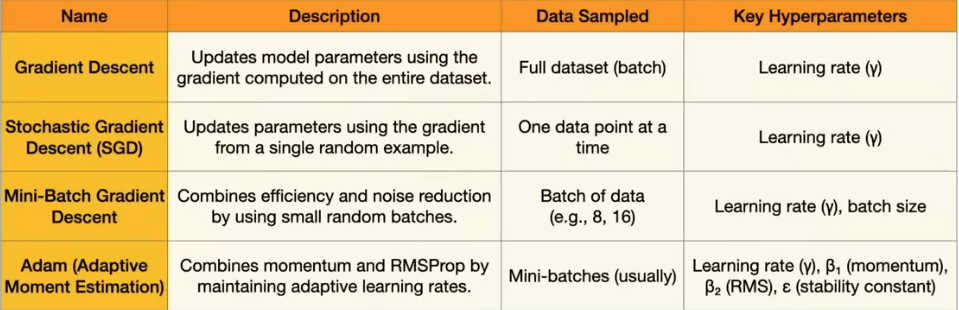
Optimizer
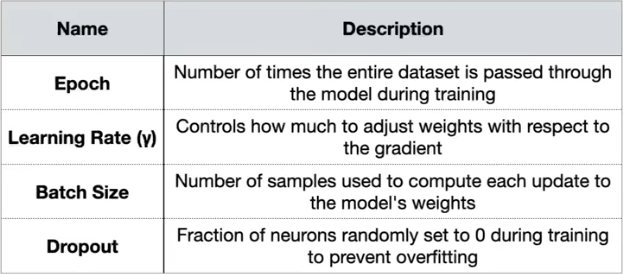
Hyperparameters
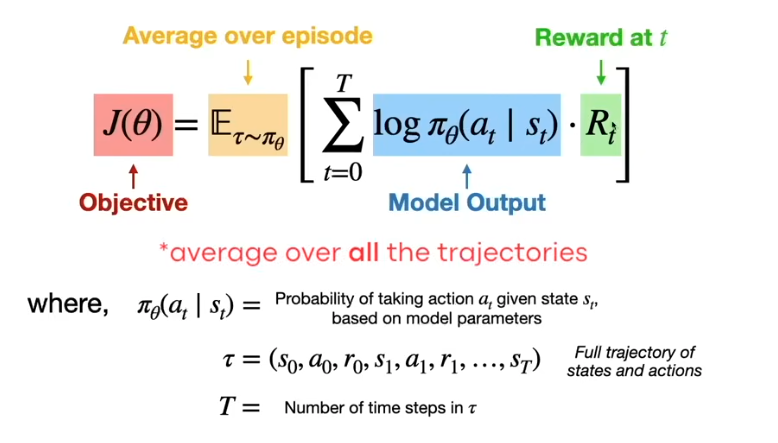
Reinforcement Learning
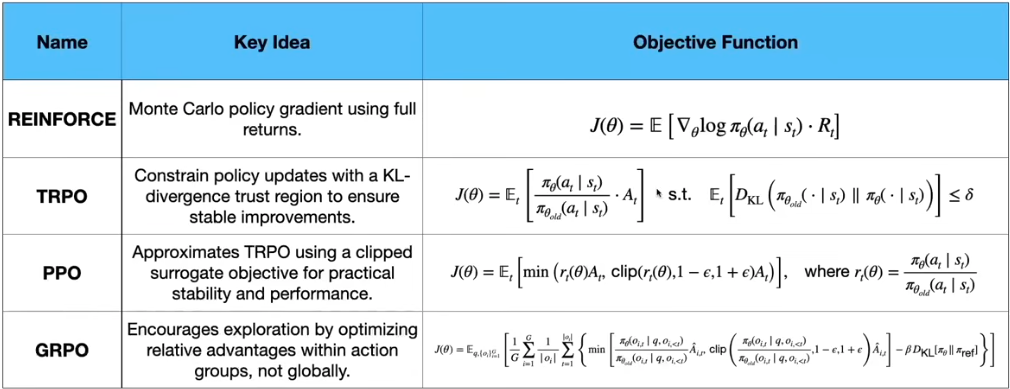
Core families to know:
- Value-based: Q-learning, Deep Q-Networks (DQN) and variants (Double DQN, Dueling DQN).
- Policy-based: REINFORCE, policy gradients — optimize the policy directly.
- Actor-critic: A2C, A3C, PPO, SAC — combine a policy (actor) with a value estimator (critic); PPO is the workhorse in practice.
- Model-based: learn a world model and plan against it (MuZero, Dreamer).
- RL for LLMs: RLHF (reward model + PPO) and RLAIF align models with human preferences; DPO offers a simpler, RL-free alternative.
Curated resources:
- Sutton & Barto — Reinforcement Learning: An Introduction (free)
- OpenAI Spinning Up in Deep RL
- Hugging Face Deep RL Course
- Training language models to follow instructions with human feedback (InstructGPT / RLHF)
- Direct Preference Optimization (DPO)
Dataset
- About Train, Validation and Test Sets in Machine Learning
- What Is Balanced And Imbalanced Dataset?
- How to Build A Data Set For Your Machine Learning Project
- Impact of Dataset Size on Deep Learning Model Skill And Performance Estimates
- Best practices for creating training data
Machine Learning (ML)
- The Future of AI; Bias Amplification & Algorithmic Determinism
- What Do You Need to Know About the Limits of Machine Learning?
- The Limitations of Machine Learning
- The Limitations of Deep Learning
- Ethics of ML
ML on embedded devices
- TinyML models — what happens behind the scenes
- Signal processing is key to embedded Machine Learning
ML pipeline
The canonical end-to-end flow. Each stage has its own failure modes — most production issues live at the boundaries.
- Data ingestion — pull from warehouses, APIs, logs, labelers.
- Cleaning & validation — handle missing values, outliers, schema checks (e.g. Great Expectations, Pandera).
- Feature engineering — encoding, scaling, aggregations; track with a feature store (Feast).
- Training — model selection, hyperparameter tuning, reproducible runs.
- Evaluation — offline metrics, slice-based analysis, calibration, fairness checks.
- Deployment — batch, online service, or edge; versioned artifacts.
- Monitoring — data/concept drift, performance decay, alerting, feedback loops.
See the ### MLOps & Deployment section below for tooling.
Feature Selection and Extraction
- Feature Selection and Feature Extraction in Machine Learning: An Overview
- What is the difference between feature extraction and feature selection?
- Average and Root Mean Square (RMS) Calculations
- But what is the Fourier Transform? A visual introduction.
- Why the Power Spectral Density (PSD) Is the Gold Standard of Vibration Analysis
Neural Networks and Training
- Machine Learning for Beginners: An Introduction to Neural Networks
- Youtube: An Introduction to Neural Networks
- how neural networks work with forward- and backpropagation
- Using neural nets to recognize handwritten digits
- A Gentle Introduction to the Rectified Linear Unit (ReLU)
- A Simple Explanation of the Softmax Function
- Keras Layers API
Speech and Language Processing
Model Evaluation, Underfitting, and Overfitting
- Confusion Matrix
- Everything you Should Know about Confusion Matrix for Machine Learning
- Beyond Accuracy: Precision and Recall
- StackExchange: How to calculate precision and recall in a 3 x 3 confusion matrix
- Youtube: Underfitting in a Neural Network
- Youtube: Overfitting and a Neural Network
- Caltech Lecture: Overfitting
- Dropout: A Simple Way to Prevent Neural Networks from Overfitting
Anomaly Detection
- Anomaly Detection for Dummies
- Anomaly Detection with Machine Learning: An Introduction
- Detection in Time-Series Data and K-Means Clustering
- K Means
Convolutional Neural Networks(CNN)
- CNN: A Comprehensive Guide to Convolutional Neural Networks
- Notes about CNNs from Stanford's CS231n course
- Youtube: Convolutional Neural Networks (CNNs) explained
- Youtube: MIT 6.S191(2020): Convolutional Neural Networks Lecture
- Convolutional Neural Networks (CNN): Step 1(b) - ReLU Layer
- 1D Convolutional Neural Networks and Applications – A Survey
- A Gentle Introduction to Dropout for Regularizing Deep Neural Networks
- How to Configure the Learning Rate When Training Deep Learning Neural Networks
- Fourier Transform
NLP & Sequence Models
The path from bag-of-words to the Transformer is the shortest route to understanding modern LLMs.
- Text preprocessing: normalization, tokenization (word, subword — BPE, WordPiece, SentencePiece), stop words, stemming/lemmatization.
- Classical representations: one-hot, TF-IDF, BM25, n-grams. See
ai/llm/index.mdfor TF-IDF/BM25 details. - Word embeddings: Word2Vec (CBOW/skip-gram), GloVe, FastText. Learn why
king - man + woman ≈ queen. - Sequence models: RNN, LSTM, GRU, bidirectional variants, seq2seq with encoder-decoder.
- Attention & Transformers: dot-product attention, multi-head self-attention, positional encoding, the full Transformer block. See
ai/llm/transformer.md. - Pre-trained families: encoder (BERT, RoBERTa), decoder (GPT family, Llama, Qwen), encoder-decoder (T5, BART). Understand pre-training objectives (MLM vs causal LM) and downstream fine-tuning.
Curated resources:
- The Illustrated Transformer (Jay Alammar)
- The Illustrated BERT, ELMo, and co.
- Stanford CS224N — NLP with Deep Learning
- Speech and Language Processing (Jurafsky & Martin, 3rd ed., free)
- Hugging Face — NLP Course
- Attention Is All You Need (original Transformer paper)
- Andrej Karpathy — Let's build GPT from scratch
Sample Rate and Bit Depth
- how speakers work
- how to covers the common audio sample rates
- Data Augmentation | How to use Deep Learning when you have Limited Data — Part 2
- Digital Audio Basics: Sample Rate and Bit Depth
Mel Frequency Cepstral Coefficient(MFCC)
- The Nyquist–Shannon Theorem
- Sampling Theorem and Frequency Spectrum Aliasing
- Mel Frequency Cepstral Coefficient (MFCC)
- Speech Processing for Machine Learning: Filter banks, Mel-Frequency Cepstral Coefficients (MFCCs) and What's In-Between
- Sensor Fusion
AI Accelerator
- What Makes a Good AI Accelerator
- How to Make Your Own Deep Learning Accelerator Chip
- DNN Accelerator Architecture - SIMD or Systolic?
Image Classification and Neural Networks
- How Does Image Classification Work?
- Basic classification: Classify images of clothing
- PIL.Image
- scikitimage.transform
- OpenMV
CNN Visualizations and Data Augmentation
- Saliency map
- Grad-CAM: Visualize class activation maps with Keras, TensorFlow, and Deep Learning
- Neural Network Interpretation
- Grad-CAM: Visual Explanations from Deep Networks via Gradient-based Localization
- Data Augmentation - How to Use Deep Learning When You have Limited Data--Part 2
- How to Configure Image Data Augmentation in Keras
- A survey on Image Data Augmentation for Deep Learning
Transfer Learning
- A Gentle Introduction to Transfer Learning for Deep learning
- Transfer learning - Machine Learning's Next Frontier
- Youtube - Transfer Learning
- A Comprehensive Hands-on Guide to Transfer Learning with Real-World Applications in Deep Learning
- An Overview on MobileNet: An Efficient Mobile Vision CNN
- MobileNets: Efficient Convolutional Neural Networks for Mobile Vision Application
Object Detection
- Classification: Precision and Recall
- Intersection over Union (IoU) for Object Detection
- mAP (mean Average Precision) for Object Detection
- The PASCAL Visual Object Classes (VOC) Challenge
- COCO Detection Evaluation Metrics
R-CNN
- Rich feature hierarchies for accurate object detection and semantic segmentation (R-CNN)
- Fast R-CNN
- Faster R-CNN: Towards Real-Time Object Detection with Region Proposal Networks
- SSD: Single Shot MultiBox Detector
- Feature Pyramid Networks for Object Detection
- YOLOv4: Optimal Speed and Accuracy of Object Detection
- Speed/accuracy trade-offs for modern convolutional object detectors
Advanced Image Processing
- Fully Convolutional Networks for Semantic Segmentation
- U-Net: Convolutional Networks for Biomedical Image Segmentation
- Mask R-CNN
- Faster R-CNN for Robust Pedestrian Detection Using Semantic Segmentation Network
- Optimizing the Trade-off between Single-Stage and Two-Stage Deep Object Detectors using Image Difficulty Prediction
- Self-Supervised Learning Methods for Computer Vision
- Multi-task Self-Supervised Visual Learning
LLM Engineering
Shipping applications with pre-trained LLMs is a distinct discipline from training them. Detailed coverage lives in ai/llm/index.md and ai/llm/fine-tuning.md; the short version:
- Prompt engineering: zero-shot, few-shot, chain-of-thought, structured outputs (JSON schema, function/tool calling).
- RAG: chunking, embeddings, vector search, re-ranking, hybrid (BM25 + vector), query expansion. See the RAG section in
ai/llm/index.md. - Agents: tool use, planning, ReAct, multi-step workflows, human-in-the-loop. See
ai/llm/langchain.md,ai/llm/llama_index.md,ai/llm/autogen.md. - Fine-tuning: SFT, LoRA / QLoRA, preference tuning (RLHF, DPO). Details in
ai/llm/fine-tuning.md. - Evaluation: golden datasets, LLM-as-judge, RAG-specific metrics (faithfulness, answer relevance). See Ragas and OpenAI Evals.
- Guardrails & safety: input/output validation, prompt injection defense, PII scrubbing. See Guardrails AI, NeMo Guardrails.
- Inference & cost: quantization (GPTQ, AWQ, GGUF), batching, KV-cache, serving with vLLM, TGI, llama.cpp.
Curated resources:
- Anthropic — Prompt Engineering Guide
- OpenAI Cookbook
- DeepLearning.AI — short courses on LLMs, RAG, Agents
- Full Stack LLM Bootcamp
- Building LLM Powered Applications (Hugging Face)
MLOps & Deployment
Getting a model to production is usually harder than training it.
- Experiment tracking: MLflow, Weights & Biases, Neptune.
- Data & pipeline orchestration: Airflow, Prefect, Dagster, Kubeflow Pipelines.
- Model registry & packaging: MLflow Model Registry, BentoML, ONNX for portability.
- Serving: TorchServe, NVIDIA Triton, vLLM, KServe, Ray Serve.
- Monitoring: drift and performance — Evidently, Arize, WhyLabs. For LLMs specifically: LangSmith, Langfuse, Helicone.
- CI/CD for ML: DVC for data/model versioning, GitHub Actions for training/eval pipelines, infra-as-code for reproducibility.
Curated resources:
- Google — Rules of Machine Learning
- Made With ML — MLOps course
- Chip Huyen — Designing Machine Learning Systems (book)
- ml-ops.org — patterns and references
Responsible AI
Ship models that work for everyone and that you can explain after the fact.
- Fairness & bias: measure across slices, not just overall accuracy; use toolkits like Fairlearn and AI Fairness 360.
- Privacy: differential privacy (Opacus for PyTorch), federated learning, PII redaction, minimization of training data.
- Interpretability: feature attribution (SHAP, LIME), vision saliency (Grad-CAM, already linked above), mechanistic interpretability for LLMs.
- Evaluation beyond accuracy: calibration, robustness to distribution shift, adversarial robustness, toxicity, hallucination rate for LLMs.
- Governance: model cards, data sheets, audit trails, alignment with frameworks such as the NIST AI Risk Management Framework and the EU AI Act.
Curated resources:
- Model Cards for Model Reporting (Mitchell et al.)
- Datasheets for Datasets (Gebru et al.)
- Fairness and Machine Learning — fairmlbook.org
- Interpretable Machine Learning (Christoph Molnar, free)
Neural network architecture example
import tensorflow as tf
from tensorflow.keras.models import Sequential
from tensorflow.keras.layers import Dense, InputLayer, Dropout, Conv1D, Conv2D, Flatten, Reshape, MaxPooling1D, MaxPooling2D, AveragePooling2D, BatchNormalization, Permute, ReLU, Softmax
from tensorflow.keras.optimizers.legacy import Adam

EPOCHS = args.epochs or 100
LEARNING_RATE = args.learning_rate or 0.005
# If True, non-deterministic functions (e.g. shuffling batches) are not used.
# This is False by default.
ENSURE_DETERMINISM = args.ensure_determinism
# this controls the batch size, or you can manipulate the tf.data.Dataset objects yourself
BATCH_SIZE = args.batch_size or 32
if not ENSURE_DETERMINISM:
    train_dataset = train_dataset.shuffle(buffer_size=BATCH_SIZE*4)
train_dataset=train_dataset.batch(BATCH_SIZE, drop_remainder=False)
validation_dataset = validation_dataset.batch(BATCH_SIZE, drop_remainder=False)

# model architecture
model = Sequential()
model.add(Reshape((int(input_length / 13), 13), input_shape=(input_length, )))
model.add(Conv1D(8, kernel_size=3, padding='same', activation='relu'))
model.add(MaxPooling1D(pool_size=2, strides=2, padding='same'))
model.add(Dropout(0.25))
model.add(Conv1D(16, kernel_size=3, padding='same', activation='relu'))
model.add(MaxPooling1D(pool_size=2, strides=2, padding='same'))
model.add(Dropout(0.25))
model.add(Flatten())
model.add(Dense(classes, name='y_pred', activation='softmax'))

# this controls the learning rate
opt = Adam(learning_rate=LEARNING_RATE, beta_1=0.9, beta_2=0.999)
callbacks.append(BatchLoggerCallback(BATCH_SIZE, train_sample_count, epochs=EPOCHS, ensure_determinism=ENSURE_DETERMINISM))

# train the neural network
model.compile(loss='categorical_crossentropy', optimizer=opt, metrics=['accuracy'])
model.fit(train_dataset, epochs=EPOCHS, validation_data=validation_dataset, verbose=2, callbacks=callbacks)

# Use this flag to disable per-channel quantization for a model.
# This can reduce RAM usage for convolutional models, but may have
# an impact on accuracy.
disable_per_channel_quantization = False
Page Source